
Shopify Tips and Tricks: Boosting Your E-Commerce Game
- jammie04
- Jan 14
- 3 min read

Running an online store on Shopify comes with endless possibilities, but are you making the most of the platform? Whether you’re just starting or looking to optimize your existing store, these Shopify-specific tips and tricks will help you elevate your e-commerce game. From customizing your checkout experience to fine-tuning post-purchase emails, we’ve got you covered.
1. Optimize Your Store Design
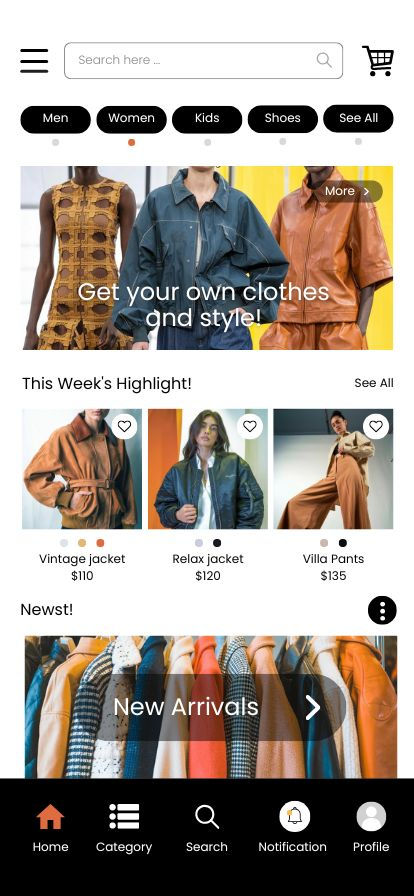
Your Shopify store’s design plays a huge role in turning browsers into buyers.
Tips for an Eye-Catching, User-Friendly Design:
Use High-Quality Images: Showcase your products with crisp, professional photos.
Choose a Mobile-Responsive Theme: Shopify’s theme store has plenty of options—pick one that works seamlessly on all devices.
Simplify Navigation: Use clear categories and minimize the number of clicks it takes for a customer to find what they need.
Pro Tip: Customize your theme’s color scheme and fonts to align with your brand identity. Small tweaks make a big difference!
2. Speed Up Your Store
Fast-loading pages are crucial for both customer satisfaction and SEO.
How to Improve Load Speed:
Compress Images: Use tools like TinyPNG to reduce file size without sacrificing quality.
Limit Apps: Only keep apps that are essential to your store’s functionality.
Enable Lazy Loading: Load images only when they come into view to save bandwidth.
Use Shopify’s Built-In CDN: Shopify automatically hosts your files on a content delivery network, so take advantage of this feature.
Pro Tip: Test your store speed with Shopify’s built-in analyzer or Google PageSpeed Insights.
3. Leverage Shopify Apps
Shopify’s app store offers tools for everything from marketing to logistics.
Must-Have Apps for Shopify Stores:
Klaviyo: For email marketing and customer segmentation.
Yotpo: To display and collect product reviews.
ReConvert Upsell & Cross-Sell: Boost your average order value with personalized post-purchase offers.
Plug In SEO: Get suggestions to improve your site’s search engine visibility.
Pro Tip: Always read app reviews and test their impact on your store’s performance before committing.
4. Customize the Checkout Experience
Shopify allows you to personalize the checkout process on its Shopify Plus plan, but even on other plans, you can still optimize the experience.
Tips for a Better Checkout:
Add Your Logo: Keep branding consistent by uploading your logo to the checkout page.
Edit Checkout Language: Adjust the wording of buttons and messages to match your brand’s tone.
Enable Express Checkout Options: Accept Apple Pay, Google Pay, and Shop Pay for quicker conversions.
Pro Tip: Don’t underestimate the power of a clean, distraction-free checkout page. Remove unnecessary fields to make the process seamless.
5. Enhance Post-Purchase Emails
Your order confirmation and follow-up emails are an extension of your brand and an opportunity to drive loyalty. You don't want your order confirmation email to look like it's coming from Shopify (The Brand), you want it to look like it's coming from YOUR brand, YOUR store. Customers unfamiliar with Shopify will be left confused and others will see a less "professional" side of your brand.
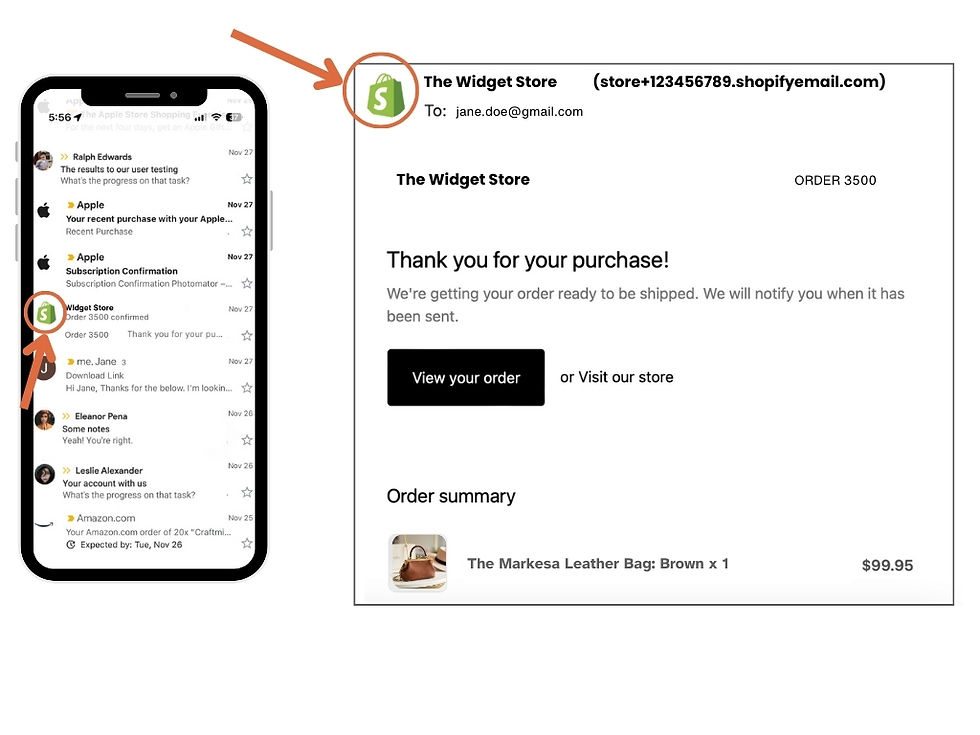
How to Customize Post-Purchase Emails:
Use Shopify’s Notifications Editor: Add your logo, brand colors, and personalized text to the default templates.
Upsell in Follow-Ups: Include product recommendations or discounts for future purchases.
Add Value: Share helpful tips related to the purchased product or a link to your blog for related content.
Show Gratitude: A simple “Thank you for supporting our business” goes a long way in building customer relationships.
Pro Tip: Use Shopify Email or integrate with tools like Klaviyo for advanced email personalization and automation.
6. Analyze and Iterate
The key to a successful Shopify store is ongoing optimization.
What to Monitor:
Shopify Analytics Dashboard: Track sales, traffic, and customer behavior.
Abandoned Cart Reports: Identify and address reasons why customers might not complete their purchases.
Google Analytics Integration: Gain deeper insights into visitor demographics and behavior.
Pro Tip: Regularly A/B test different strategies—like product page layouts or email subject lines—to see what works best.
Final Thoughts
Shopify offers powerful tools to help you create and grow a successful online store. With these tips and tricks, you can enhance your store’s functionality, improve customer experience, and build lasting relationships. Remember, small improvements add up over time, so keep experimenting and learning as you go. Happy selling!